
DSP Manager & Equalizer Pro1.0.7 - Google Play
You'll be able to see results in few seconds.
Publisher Description
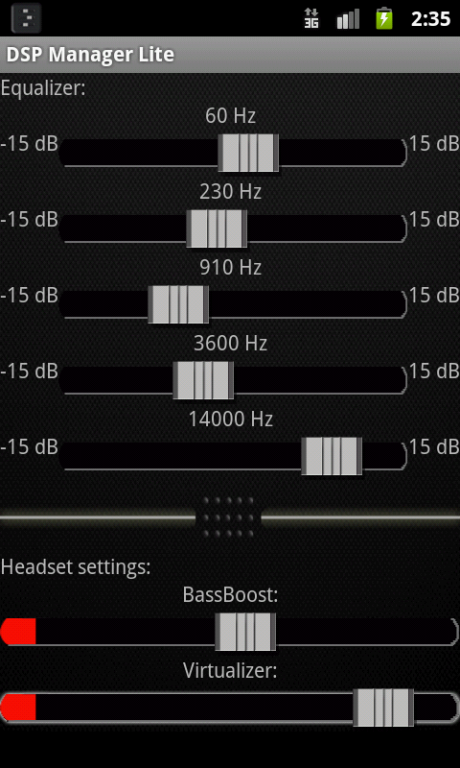
DSP Manager Pro is a powerful digital sound processing app for android. it comes with a graphic equalizer, bassboost, reverb presets and a virtualizer. The 2X equalizer is in beta test, it may not work on your device.
--- PLEASE CHECK OUT THE FREE VERSION FIRST TO SEE IF IT WORKS ON YOUR DEVICE.---
---The number of bands and frequency ranges vary with devices/roms.---
features:
★ HomeScreen FX Control widget
★ Dual mode Equalizer
★ 10 Stock Equalizer Presets (if rom supports)
★ Save, delete, rename preset
★ Reverb presets (small room, medium room, large room, medium hall, large hall, plate)(if rom supports)
★ 2X Equalizer with three different rendering modes (Slight, Normal, Heavy)
★ Stereo Virtualizer (Headphone 3D effect) using stereo widening.
★ Bass booster
★ Separate profiles for Headphone & Loudspeaker
★ Automatic mode selection (HS & LS)
★ Works with all music players.
★ No root required
★ No Ads
Stock presets include:
★ Normal
★ Classical
★ Dance
★ Flat
★ Folk
★ Heavy Metal
★ Hip Hop
★ Jazz
★ Pop
★ Rock
If you have any issues, please feel free to mail us.
Note: - Cyanogenmod users please disable your stock DSP Manager bundled with your rom.
- Please disable your default DSP Manager, Audio Equalizer, beats audio or any other sound manager for better performance.
- This app will apply FX to global O/P mix. (Notifications, Media, Alarm, Ringtone etc.)
About DSP Manager & Equalizer Pro
The company that develops DSP Manager & Equalizer Pro is Creative Day. The latest version released by its developer is 1.0.7.
To install DSP Manager & Equalizer Pro on your Android device, just click the green Continue To App button above to start the installation process. The app is listed on our website since 2013-09-04 and was downloaded 0 times. We have already checked if the download link is safe, however for your own protection we recommend that you scan the downloaded app with your antivirus. Your antivirus may detect the DSP Manager & Equalizer Pro as malware as malware if the download link to com.hbstudios.dspmanagerpro is broken.
How to install DSP Manager & Equalizer Pro on your Android device:
- Click on the Continue To App button on our website. This will redirect you to Google Play.
- Once the DSP Manager & Equalizer Pro is shown in the Google Play listing of your Android device, you can start its download and installation. Tap on the Install button located below the search bar and to the right of the app icon.
- A pop-up window with the permissions required by DSP Manager & Equalizer Pro will be shown. Click on Accept to continue the process.
- DSP Manager & Equalizer Pro will be downloaded onto your device, displaying a progress. Once the download completes, the installation will start and you'll get a notification after the installation is finished.
Program Details
System requirements
Download information
Pricing
Version History
version 1.0.7
posted on 2013-09-04
26 Aug 2013(V1.0.7) - bug fix.,19 May 2013(V1.0.6) - minor bug fix.,07 May 2013(V1.04) - Added widget support,27 April 2013(V1.0.3) - important bug fix.
version 1.0.6
posted on 2013-05-20
Several fixes and updates
Disclaimer
Official Google Play Link
We do not host DSP Manager & Equalizer Pro on our servers. We did not scan it for viruses, adware, spyware or other type of malware. This app is hosted by Google and passed their terms and conditions to be listed there. We recommend caution when installing it.
The Google Play link for DSP Manager & Equalizer Pro is provided to you by apps112.com without any warranties, representations or guarantees of any kind, so access it at your own risk.
If you have questions regarding this particular app contact the publisher directly. For questions about the functionalities of apps112.com contact us.
